10.10 Who can open the result?
- Approved by
- Panaversity ·
In everyday life. You pin a note with the door code on the office notice board, for one colleague. You never sent it to anyone. But everyone who walks past the board can read it. And the note stays up until someone takes it down.
What you will learn.
- If nobody sent the result, how did it go out?
- What tier is a result?
- Who can open it now, and where do you look?
- Whose name does the worker use when it saves a file?
- Can an approved result still change?
- When the work is done, who takes the access back?
You practice it in Task 10 of the lab.
Why it matters. Data you never sent cannot leak, as 10.2 says. A result can leak without being sent. It goes out when more people can open it.
So far this chapter has tested data on the way in. And 10.7 stopped the worker from sending anything. So it is easy to believe that a result nobody sent is still inside. This page tests that belief.
If nobody sent it, how did it go out?
On Monday, December 14, Maria, the office manager at Brightline, ran the duplicate check again, the right way. She worked in the AP project in the company's AI workspace. Her copy of the vendor master kept only names, addresses, the type of tax ID and its last four digits (10.2). At 9:20 a.m. the worker returned nine candidate pairs, possible duplicates for a person to confirm. Nobody sent the list anywhere.
At 9:35 Maria asked the worker to "save it where Dave can see it." It saved the file to the company's shared drive through Maria's connector, into the Year-end folder. The whole finance team can open that folder. At 9:40 she also added the list to the AP project's files, "so the worker has it." At 10:05 Dave, the controller, was away from his desk and could not open the shared drive on his phone. So Maria set the file's link to "anyone with the link" and texted it to him.
At 11:30 Dave asked, "Who can open this?" Maria looked in the AP inbox. Nothing had been sent. The answer was somewhere else. Through the folder, the whole finance team could open the list. Through the project, every member could, including Jordan Ellis, the clerk hired for year-end, who had uploaded a file there on December 8. And through the link, anyone who held it could, with no list of names at all.
The list had gone out three times, and no one had pressed send. A result goes out when its audience, the people who can open it, grows. So a result gets the same test as data going in:
- Classify the result.
- Name its audience: the people it is for, approved by the data's owner.
- Check who can open it now.
- Check whether it can still change after it was approved.
- Give each share an end, and check that the access really ended.
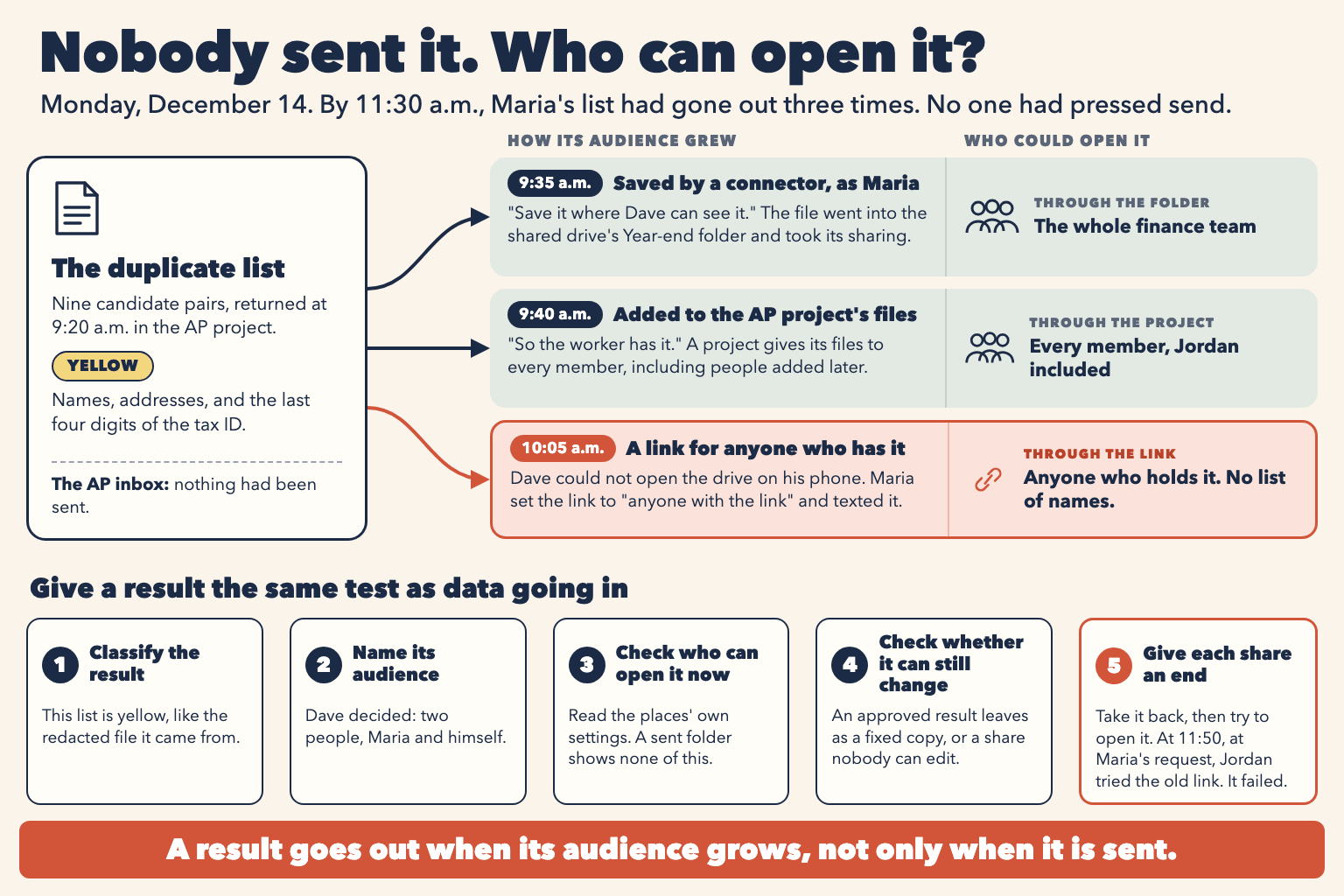
Figure 10.6. Three ways Maria's list went out on December 14, with no send, and the five-step test a result gets.
What tier is a result?
A result carries the highest tier of what went into it, unless the task removed that data. On December 6, Maria's results file from her personal account listed nine pairs with full tax ID numbers. It was red, even though it was "only the results." The December 14 list kept names, addresses and the last four digits. Like the redacted file it came from, it is yellow (10.2). The tier decides who may open the result, just as it decides which route data may take.
Who can open it now, and where do you look?
An audience grows in four ways, and none of them is a send.
- Through a project. Every member can open the project's files, including people added later. On some products, members can also read each other's chats in a shared project (10.9).
- Through a folder or a shared document. A file takes the sharing of the place where it is saved. Saving into a shared folder shares the file.
- Through a link. A link open to "anyone with the link" has no list of names. Whoever holds it can open it, and can forward it.
- Through a connector. The worker saves with the access of the person who connected it. The next section explains why that matters.
A sent folder shows none of this. Only the places' own settings do: the project's members, the folder's sharing list, the link's setting and the file's owner. Read them before you save or share a result, and again when someone asks. Then make them match the audience you named. A wide audience is fine for a green result, such as a public notice for vendors. For a yellow or red one, a narrow audience has a small price. Dave must sign in on his phone, instead of tapping a link.
Whose name does the worker use when it saves a file?
A connector reaches other apps with your own permissions (Chapter 8). So when the worker saved the list through Maria's connector, the file became Maria's. It went where Maria's access reached, and it took that folder's sharing. The worker never chose an audience. It used Maria's. Chapter 7 said that other systems record the worker's actions as yours. The same is true of what it saves: the file shows you as its owner, and you answer for who can open it. So before a worker saves results through a connector, know whose connector it is and where it saves.
Can an approved result still change?
The principle in 10.7 is that nothing can change an output after approval. A link to a working document hands over a place, not a copy. Say Dave approves the corrected schedule for the auditors, then sends them a link to the working document. Maria's connector can still edit that document. The next morning, the worker tidies the table, and the auditors now read a version Dave never approved. So an approved result leaves as a fixed copy, such as a PDF of the approved version. Or it leaves as a share that nobody can edit after approval. 10.6 called an uploaded copy a problem because it is frozen. For a signed result, frozen is the protection.
When the work is done, who takes the access back?
A share does not end by itself. What the AI makes is still there after the chat closes (Chapter 1), and some links have no end date (10.9). So each share gets an owner and an end. Write them in the workflow's Governance Record (10.4), next to the audience. At the end, remove the link, remove the extra copies and narrow the place. Then check it the way 10.6 checks a takedown: try to open the result from an account that should no longer reach it. Removing a link stops people opening it later. It does not reach a copy someone already downloaded. That is why the audience is decided before the share, not after.
Back at 11:30, Dave decided the list was for two people, Maria and himself, because they confirm each pair. Jordan was staying on for the January close, so he still needed the project and the folder. The list had to move, not Jordan. Maria moved the file to a folder only she and Dave can open, and set the link back to invited people only. She removed the list from the project's files, because the worker's own job checks invoices, not vendors, and never needed it. At 11:50, Maria asked Jordan to test the old link from his own account, and it did not open. Maria wrote the audience and its end in the Governance Record. On the day the year-end tax forms are filed, she deletes the copy, Dave decides whether one is kept in restricted storage, and she checks again.
Check yourself
Question 1 / 9
0 answered
Maria saved the duplicate list and sent it to nobody. What decides who can open it?
- Owner
- Panaversity