10.7 When a human must sign
- Status
- stable
- Owner
- Panaversity
- Approved
- Panaversity ·
In everyday life. A school sends home a permission slip, a form for a parent to sign. A parent's signature means the parent read it. If the child signs the parent's name, the school has no permission, no matter how neat the signature is.
What you will learn. Which pieces of work a person must sign, how to name who checks what and when, and how to stop anything from going out that only a person may release. You practice it in steps 6 and 8 of the lab.
Why it matters. Other people trust a signed document because they trust the person who signed it. If anyone can send in that person's name, the signature means nothing.
A signature says that a named person read this, checked what it is based on, and takes responsibility for it. An AI Worker can prepare the work. It cannot sign, because accountability does not move to a tool. In this chapter's story, Brightline's AP Worker drafted a schedule of the bills the company owed, for its auditors, and an email with the name of Dave, the controller, at the bottom. The auditors relied on Dave's name. Dave had not read the schedule. Maria sent it like any other draft, and nothing marked it as one that only Dave could sign.
"A human will review it" is an intention, not a control. A defined gate, a check that must happen before work goes out, names three things:
- Who reviews: the person who holds the responsibility.
- What they check: the specific risk the review exists to catch.
- When they check: before the output becomes hard to undo.
For the auditors' schedule: "Dave checks every balance against the register, including currency, before the schedule leaves Brightline, and sends it himself." If you cannot write the gate that way, the workflow is not ready.1
A person must sign, using their own identity, when an output:
- commits the company to money above a set limit, such as $5,000.00 at Brightline
- changes an official record, such as a vendor's bank details (Chapters 6 and 9)
- goes to auditors, regulators, tax authorities or courts
- states balances, amounts owed or a position in a dispute to someone outside the company
- decides something about a person: hiring, pay, discipline, access
- is a legal commitment
- is in a high-risk area under an AI vendor's usage policy (10.3)
For these, the principle is: the accountable person approves the exact output before it is released, and nothing can release it unapproved or change it after approval. There are two ways to build that.
- Baseline. The worker cannot send at all. It drafts, and the signer sends.2
- Advanced. An approval step releases only the exact approved output, to the approved recipient. The system enforces it, and it is tested before anyone relies on it.
Brightline uses the baseline. Maria signs the replies to vendors that the list covers: she reads each one and sends it herself. Part IV builds the advanced way on DSoR, the Data System of Record. Approvals are recorded from the approver's own login. They are never recorded from an account the worker acts through, such as Maria's (Chapter 7).
Anthropic, as verified 8 October 2026.
- Tool permissions. On Team and Enterprise, Owners set each connector's tools, grouped as read-only or write and delete, to always allow, needs approval or blocked. The setting applies to everyone using the connector, and members cannot override it. It can only limit what the connected system already permits.3
OpenAI, as verified 8 October 2026.
- Action controls. On Business, Enterprise and Edu, admins choose which read and write actions of each app are enabled. They also set how ChatGPT asks: always ask, allow read actions but ask before changes, or allow low-risk actions. The setting covers the workspace, and an app can have its own setting where that is supported. On Enterprise and Edu, roles decide who can use each app. Some apps have no action controls, so admins can manage only whether the app is available.4
What differs, and why it matters. Anthropic's help page says clearly that Owners on Team and Enterprise can block one write tool for everyone. OpenAI's documentation describes action controls for each app on Business, Enterprise and Edu, but some apps have none. Before you rely on blocking a send action, check that your plan and your app offer it. If they do not, remove the app or connector, and have the worker save its drafts in a folder. One limit is the same on both. The documented controls work for each tool or action, not for each recipient. Blocking send blocks every send. So a rule such as "vendors yes, auditors never" needs the advanced way.
What stays true. A rule the worker can break is not a control. Block the action or remove the tool. And "needs approval" or "always ask" is a gate only when the person who clicks approve is the person who must sign. When Maria approves a send in her session, that is not Dave signing the schedule.
You can trust a signature only as much as the review behind it. That review needs the source in front of the reviewer, time, a named risk to look for, and the authority to reject.1 It is fine not to read every line when checks were built first, such as totals checked against the source.2 Not reading is never fine just because of a deadline.
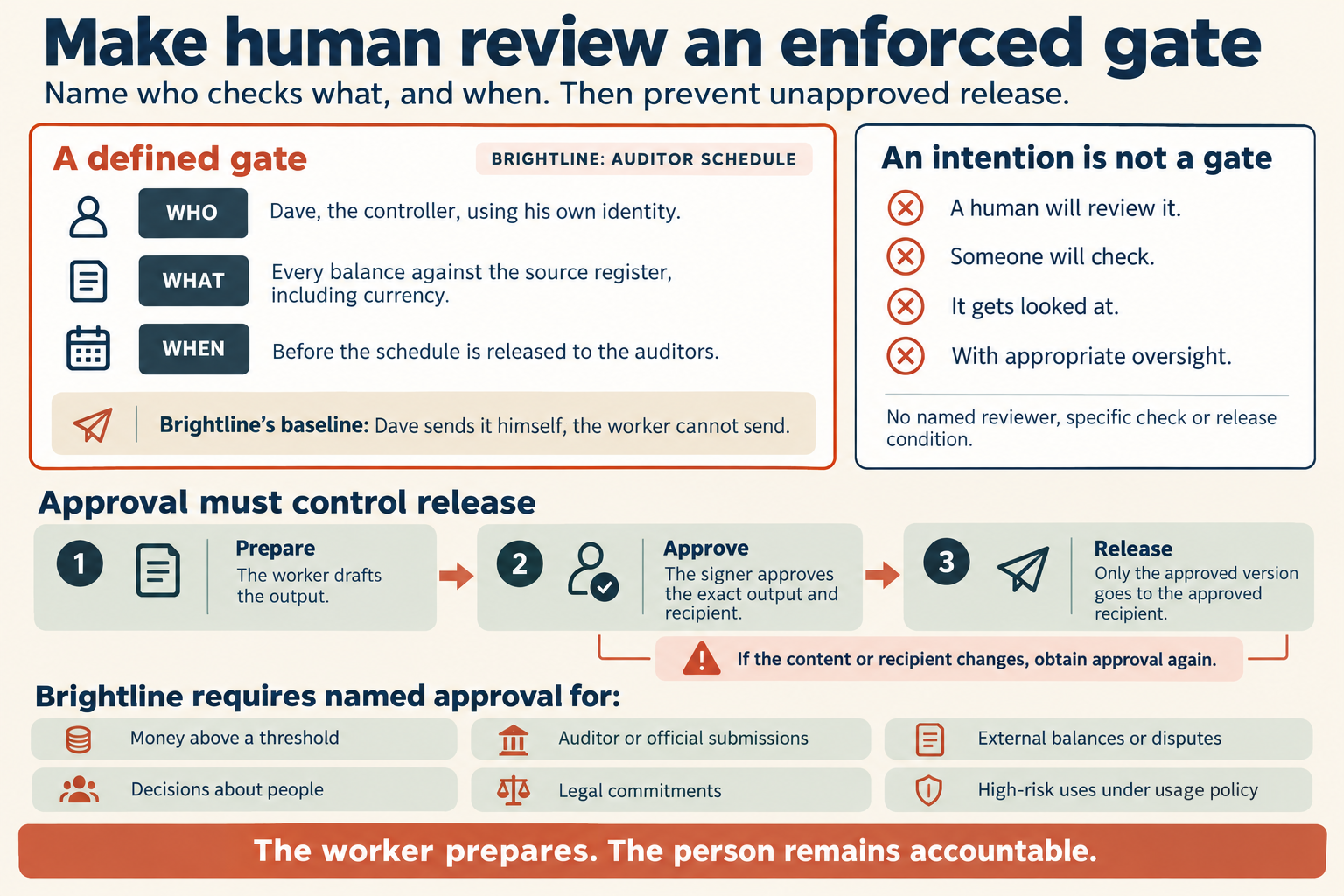
Figure 10.4. A defined gate for the auditors' schedule. The page's list adds a seventh kind of output: changing an official record, such as a vendor's bank details.
Check yourself
Question 1 / 7
0 answered
What does a signature on a schedule sent to auditors mean?
Sources
- Governance, Risk & Responsible Use: A Crash Course, Panaversity, first edition.↑↑2
- Code You Never Write: A Crash Course, Panaversity, first edition.↑↑2
- Use connectors to extend Claude's capabilities, Claude Help Center.↑
- Admin controls, security, and compliance for plugins and apps, OpenAI Help Center.↑
10.6 Ownership, approval and takedown of knowledge
Why every piece of knowledge needs an owner, how a takedown differs from deprecation, and how to remove every copy that is served.
10.8 When something goes wrong
The five steps for the first hour after data goes where it should not, and why near misses and honest reports matter.