12.7 How today's tools realize it
- Approved by
- Panaversity ·
In everyday life. Three hardware stores sell the same kind of drill. The motor, the bit and the trigger work the same way in each. Each store keeps the drill in a different aisle, the safety catch sits in a different place, and one store sells only the drill, so you bring your own battery. Concepts 12.1 to 12.6 taught the drill. This page shows how each store sells it, as of November 3, 2026, and then you pick one up.
What the vendors say each tool is for. Anthropic calls Claude Code an agentic coding tool that reads your codebase, edits files, runs commands and works with your development tools, git included.1 The conversation you used in Part II runs code and works in your folders too, and Anthropic says the same agentic capabilities now run in any conversation, for knowledge work beyond coding.23 OpenAI says it is bringing Work, its agent for longer, multi-step work and finished deliverables, into the main ChatGPT experience,4 and that Codex stays dedicated to software development, with local folders, repositories, terminals and developer tools.5 So in both apps the coding agent sits one switch from the conversation, Claude's Code tab and ChatGPT's Codex view, and the difference is the job, not the box.
How to use this page. Each section below takes one lesson. In your tool's tab, you first read how that tool applies the idea. Then you try it, in ten to twenty minutes, and check the result. If you did each practice after its lesson, go straight to the differences that change a decision.
- The practice folder. Download brightline-practice-ch12.zip and unzip it. It is separate from the lab, which has its own zip, so you can change anything in it. Open only its
brightline-apfolder. - What you need. One of the three tools. Claude Code needs a paid Claude plan, Codex runs on any ChatGPT plan, and OpenCode is free but needs a model. The tests need Node.js 24 or later, which the lab's list links.
- The tabs. Pick your tool in the first strip, and every strip on this page follows. Do Claude Code first if you can, because the lab and the Developer exam, CCDV-F, are on Claude Code. Then try one step in a second tool, to see what changes and what does not.
- The details. Version numbers, settings files and the facts the exam asks about are in the details, tool by tool. You do not need them for the steps.
Practice: the workspace
From Concept 12.2: which folder, which session, which machine. You make all three choices here, and nothing in the folder changes. Ten minutes.
Decide first. Which folder, which session, which machine? Then compare with this: brightline-ap, not the folder above it, because that one also holds live-export/, and whatever the agent reads goes to the model's provider. A new session, for this one task. This computer, so you can watch.
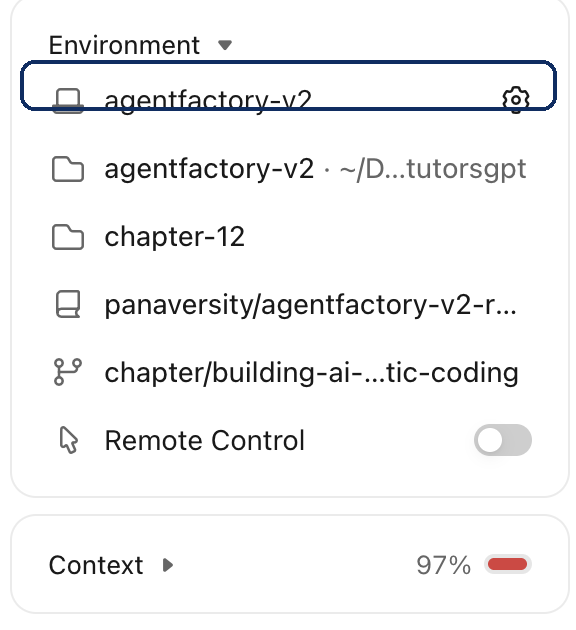
How Claude Code does it. Claude Code is the Code tab in the Claude desktop app. A session is one conversation tied to a folder, on your computer (Local) or on Anthropic's machines (Cloud), where it keeps going after you close the app.6
-
Open the Claude desktop app and choose the Code tab. If you do not have the app yet, download it, and 0.2.4 shows how to set it up.
-
Choose Open folder… and pick
brightline-ap. -
In the row under the message box, look at the environment selector, and keep Local.
-
Send: "What does this folder hold, and how is it tested? Do not change anything." Then read the cards beside the chat.
-
Ask: "Is there a folder next to this one called live-export? Tell me if you could not check."
-
Click + New. Your first session is still in the sidebar, and clicking it resumes it.

What you should see. A session in brightline-ap, on your computer, that describes the folder and changes nothing, and both sessions in the sidebar. If the agent looks next door, or asks to, you have seen that the folder is not a wall.
How Codex does it. Codex is a mode of the ChatGPT desktop app. A chat runs in the folder you open, on this computer, in a git worktree on this computer, or in the cloud, from an environment you set up once.7
- Open the ChatGPT desktop app, open the ChatGPT dropdown, and select Codex. If you do not have the app yet, download it, and 0.2.4 shows how to set it up.
- Choose Open folder and pick
brightline-ap. Set Work in to This computer. - Send: "What does this folder hold, and how is it tested? Do not change anything."
- Ask: "Is there a folder next to this one called live-export? Tell me if you could not check."
- Choose New chat. Your first chat is still in the sidebar, and opening it lets you continue.
What you should see. A chat in brightline-ap, on this computer, that describes the folder and changes nothing, and both chats in the sidebar. If it looks next door, you have seen that the folder is not a wall.
How OpenCode does it. You open a folder as a project, and a background server on your computer runs the session there, with no vendor cloud and no sandbox.8 You pick the model and set the safety rules yourself. By default almost everything is allowed, so this first section only asks questions, and the next one sets the rules.
- Download OpenCode Desktop, install it and open it.
- Choose Add project and pick
brightline-ap. - Type
/connectin the message box, and connect a model. One of OpenCode's free models is enough.9 - Send: "What does this folder hold, and how is it tested? Do not change anything."
- Ask: "Is there a folder next to this one called live-export? Tell me if you could not check."
- Start a new session with
/new. Your first session is still on the home screen, and clicking it resumes it.
What you should see. A session in brightline-ap that describes the folder and changes nothing. If it asks to look next door, you have seen that the folder is not a wall.
Practice: permissions, and a plan
From Concept 12.3: what the agent may do alone, how you read a command, and how you read a plan. Twenty minutes.
Decide first. By how hard a mistake would be to undo, which of these may run alone: adding a line to a README under git, deleting a file that is not under git, and sending your work online? Only the first. The other two should ask.
Two messages this section uses. The first puts the folder under git:
Check that git is installed. If it is missing, tell me the official way to install it, and wait. If it is there, put this folder under git, with a main branch, and make a first commit of everything here.
If a command has --global, it changes git for the whole computer. Say no, and ask the agent to set the name and email for this project only. The second is a job that touches several files, which is when a plan earns its minute:
Add a script that counts the vendors, with a test, and add a line to the README that says how to run it. Show me the plan and wait.
Your check for the plan. It names the script, the test and the README, and nothing in data/.
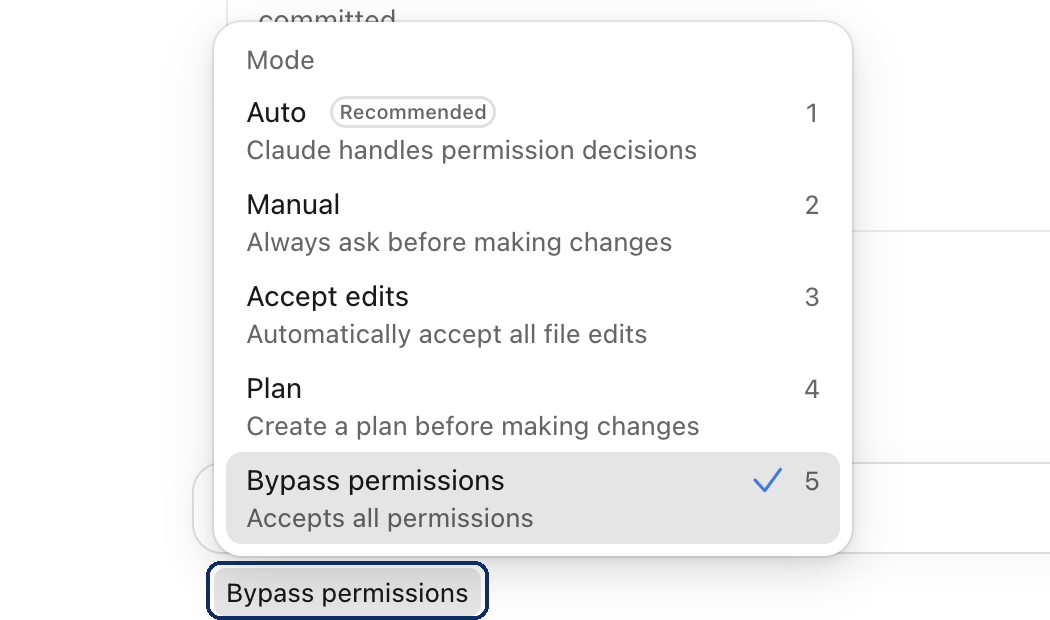
How Claude Code does it. A mode sets what Claude may do without asking, and you can change it at any time. Manual asks before edits and commands. Accept edits edits files and runs common file commands inside the folder, even deleting a file. Plan reads and proposes, and edits nothing.10
-
Find the mode selector under the message box, read the modes, and set Manual, the ladder's "Ask before acting".
-
Send the git message. Before your first yes, ask: "What does this command do?" Approve each command when you agree with what it does.
-
Switch to Plan and send the second message. Read the plan against your check, and correct what is off.
-
Switch to Accept edits and tell it to go ahead. Then ask it to run the tests and commit.

What you should see. A first commit, a command you asked about before you approved it, a plan you read before any file changed, and passing tests.
For the exam. The modes, the three settings files and their order, and that a deny rule beats an allow rule, all in the details.
How Codex does it. Two controls work together. The sandbox sets what commands can reach, and approvals set when Codex stops to ask.11 This sandbox is a limit on the commands, not the throwaway machine of 12.3. Under Ask for approval, it reads, edits and runs commands inside the project without asking, and it asks before it edits files outside or uses the internet.12 So it will not stop before each edit, which is one more reason to put the folder under git first. /plan has it propose an approach before editing.13
- Open the permissions control under the message box, and choose Ask for approval.
- Send the git message. Commands that stay inside the project may run without asking, so read each one in the chat, and ask: "What does that command do?"
- Run
/planto turn plan mode on, and send the second message. Read the plan against your check, and correct what is off. - Run
/planagain to turn it off, and tell it to go ahead. Then ask it to run the tests and commit.
What you should see. A first commit, a command you asked about, a plan you read before any file changed, and passing tests.
How OpenCode does it. Ordered rules allow, ask or deny each action, and the last matching rule wins.14 By default almost everything is allowed, so you write the rules first, in a file called opencode.jsonc. The build agent works, and the plan agent explores and proposes.15
-
Write the rules before anything changes. Ask the agent to create
opencode.jsoncin the folder with this, and to tell you in plain words what each rule does. They set edits, shell commands and folders outside the project to ask.{ "permissions": [ { "action": "edit", "resource": "*", "effect": "ask" }, { "action": "shell", "resource": "*", "effect": "ask" }, { "action": "external_directory", "resource": "*", "effect": "ask" } ] } -
In the build agent, send the git message. Before your first yes, ask: "What does this command do?" Approve each command when you agree with what it does.
-
Switch to the plan agent with
/agentand send the second message. If it asks to edit a file while it plans, say no. Read the plan against your check, and correct what is off. -
Switch back to build and tell it to go ahead. Then ask it to run the tests and commit.
What you should see. A first commit, a command you asked about before you approved it, a plan you read before any file changed, and passing tests.
Practice: the rules file
From Concept 12.4: one AGENTS.md that every tool reads, and a setting behind a rule that must never break. Twenty minutes. Use the folder from the last section, already under git.
How Claude Code does it. Claude Code reads AGENTS.md when a session starts, as long as there is no CLAUDE.md. A CLAUDE.md replaces it, and the line @AGENTS.md pulls it back in.16 These files are context, not enforcement, so a rule that must never break also goes in a settings file, where a deny rule holds in every mode.17
-
In Manual, ask Claude to read the project and draft a short
AGENTS.mdthat says never to write todata/. Read the draft, and keep only what is true and what the agent cannot guess. -
Click + New and ask: "Without opening any file, what must you never do in this project? Name the file that told you." It should name your rule and
AGENTS.md. -
See what a
CLAUDE.mdchanges. Ask Claude to create aCLAUDE.mdthat holds one line of notes. Start a fresh session and ask the same question. It should no longer know your rule. -
Bring the rule back. Ask Claude to replace everything in
CLAUDE.mdwith the one line@AGENTS.md. Ask again in a fresh session.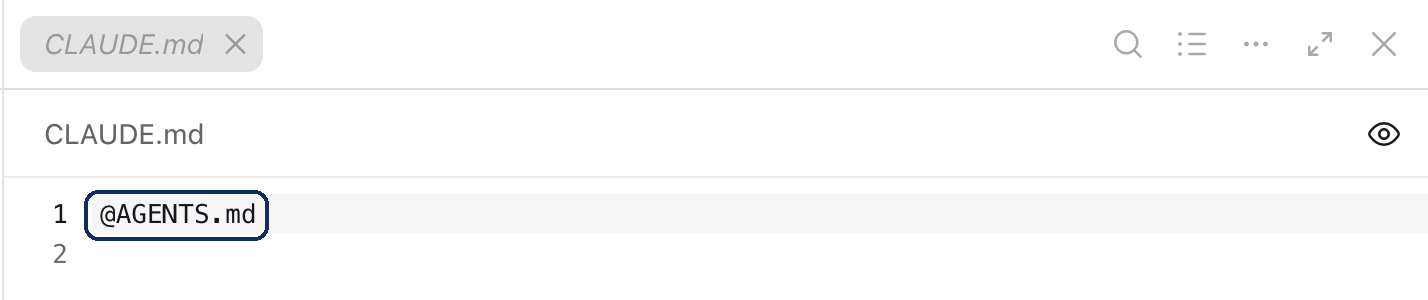
-
Back the rule with a setting. Ask Claude to create the project's settings file,
.claude/settings.json. Settings files are written in JSON, a fixed text format that programs read:{ "permissions": { "deny": ["Edit(/data/**)"] } } -
Test it. Switch to Accept edits and ask Claude to change one value in a file under
data/. If it refuses because ofAGENTS.md, say: "Try the edit anyway, to test the setting." If the edit goes through, ask Claude to undo it and to check the settings file. Switch back to Manual. -
Add a saved prompt. Ask Claude for a skill that runs your tests and reports the count. Run it by typing
/and its name. -
Ask Claude to commit everything, so the next section starts clean.

What you should see. A fresh session that names your rule, loses it when a CLAUDE.md appears, and has it again after the import. An edit under data/ that Claude says a permission rule denied, not one it chose not to make.
For the exam. The four levels of CLAUDE.md, imports up to four levels deep, when AGENTS.md is read, /init, and where skills and subagents live, all in the details.
How Codex does it. Codex reads your AGENTS.md before it does any work, from your home folder and then from each folder from the project's top down.18 The words guide it. In the default setup nothing else guards a file inside the project, because the sandbox allows writes there. A beta setting can now protect one path, which the details describe.19
- Run
/initin the message box, and read theAGENTS.mdit drafts. Ask Codex to add the line "Never write todata/." - Start a New chat and ask: "Without opening any file, what must you never do in this project? Name the file that told you." It should name your rule and
AGENTS.md. - Ask Codex to change one value in a file under
data/. Watch what it does. If it refuses, its reading of your words stopped it, and nothing else did. If it makes the change, ask it to put the file back. - Add a saved prompt. Ask Codex for a skill that runs your tests and reports the count.
- Ask Codex to commit everything, so the next section starts clean.
What you should see. A fresh chat that names your rule. In the default setup, only the words guard data/, so if Codex refused the edit, the words are what stopped it.
How OpenCode does it. OpenCode reads AGENTS.md and not CLAUDE.md, from your global file and from the folders above where you work.20 The words guide it, and a deny rule in opencode.jsonc enforces them.14
-
Run
/init, or ask the build agent to draftAGENTS.md. Make sure it says never to write todata/, then read and trim it. -
Start a new session with
/newand ask: "Without opening any file, what must you never do in this project? Name the file that told you." It should name your rule andAGENTS.md. -
Back the rule with a setting. Ask the agent to add this as the last rule in
opencode.jsonc, because the last matching rule wins, and approve the edit:{ "action": "edit", "resource": "data/*", "effect": "deny" } -
Test it. In the build agent, ask for one change to a file under
data/. If it tries a shell command instead, that falls under the rule that asks, so say no. If the edit goes through, ask it to undo the edit and to checkopencode.jsonc. -
Add a saved prompt. Ask the agent for a skill that runs your tests and reports the count.
-
Ask the agent to commit everything, so the next section starts clean.
What you should see. A fresh session that names your rule, and an edit under data/ refused without asking you.
Practice: context and sessions
From Concept 12.5: watch the context fill, take a change back, choose the effort, and hand over to a clean session. Fifteen minutes.
Decide first. Which move fits when your last step went wrong? Which fits when you are starting a new task? Then compare with this: rewind for the first, and for the second, a written handover and a fresh session.
How Claude Code does it. Each session starts with fresh context, which fills with the conversation, the files read and the commands' output. Claude summarizes on its own when it is full, and /compact lets you choose when.6 Checkpoints, which /rewind restores, undo Claude's own edits, and git keeps the lasting history.21
-
Choose the effort for the job. This job is small, so open the model picker under the message box and set Effort to low. Set it back when you finish.

-
Type
/contextin the message box. Ask it to add one line to the README that says where the data files are. Then type/contextagain, and see what grew. -
Take the change back. Run
/rewind, select the message you sent, and choose Restore code. -
Run
/compact, then ask what the task was. -
Hand over. Send: "Write what is done and what is left into NOTES.md, and commit." Click + New and send: "Read NOTES.md. What is left to do?"

What you should see. A context that grows, a change taken back, a compacted session that still knows the task, and a clean session that knows what is left because it was written down.
For the exam. /context, /compact, /rewind and what it cannot take back, the default model and the effort levels, all in the details.
How Codex does it. Each chat keeps its own context. /status shows how full it is, and /compact summarizes it.13 There is no /undo. You take a change back in the review pane, or with git.22
- Choose the effort for the job. This job is small, so open the model and reasoning control under the message box and move it toward Faster. Set it back when you finish.
- Run
/status. Ask it to add one line to the README that says where the data files are. Run/statusagain, and see what grew. - Take the change back. Open the review pane and choose Revert all. It holds every uncommitted change, so check that this line is the only one.
- Run
/compact, then ask what the task was. - Hand over. Send: "Write what is done and what is left into NOTES.md, and commit." Start a New chat and send: "Read NOTES.md. What is left to do?"
What you should see. A context that grows, a change taken back, a compacted chat that still knows the task, and a clean chat that knows what is left because it was written down.
How OpenCode does it. A circle in the session header shows how full the context is.23 OpenCode summarizes on its own near the limit, and /compact does it when you ask.24 /undo restores files from snapshots, which are not a backup, so commit anything you want to keep.25
- Choose the effort for the job.
/modelshows the models you can use. This job is small and needs no stronger model, so keep the one you have. - Ask it to add one line to the README that says where the data files are. Watch the circle in the session header, and see what grew.
- Take the change back with
/undo./redocancels the undo before you send your next message. - Run
/compact, then ask what the task was. - Hand over. Send: "Write what is done and what is left into NOTES.md, and commit." Start a new session with
/newand send: "Read NOTES.md. What is left to do?"
What you should see. A context that grows, a change taken back, a compacted session that still knows the task, and a clean session that knows what is left because it was written down.
Practice: many sessions
From Concept 12.6: split a job into parts that can run alone, give each a real brief and its own copy of the folder, and review each one before you merge it. Twenty minutes. Use the same folder.
Decide first. Could these two jobs run at the same time? Look at the files each one changes: a new test file, and the README. They do not overlap, so yes. The worktrees keep them apart in any case.
Two briefs, one for each session. The first:
Outcome. A new test file that fails if any invoice names a vendor that is not in
data/vendors.csv.Context.
data/invoices.csvanddata/vendors.csv.Format.
tests/invoice-vendors.test.ts.Constraints. Do not change
data/. Run the tests before you finish, and commit.
The second:
Outcome. A short section in the README that says what each column in
data/invoices.csvmeans.Context.
data/invoices.csv.Format. A list in
README.md.Constraints. Change only
README.md, and commit.
How Claude Code does it. Each session has its own context and its own changes, and a worktree gives it its own copy of the project.6 A subagent does a side task in its own context and hands back a summary, using the same usage limits.26 A side chat can read the session and adds nothing back to it.
-
Click + New, turn on Worktree in the row under the message box, and send the first brief.
-
Do the same again, and send the second brief.
-
While one works, open a side chat (Cmd+semicolon on macOS, Ctrl+semicolon on Windows) and ask how far along it is.
-
When the first is done, hand a check to a helper. Ask: "Use a subagent to check this change against
AGENTS.mdand report only rule breaks"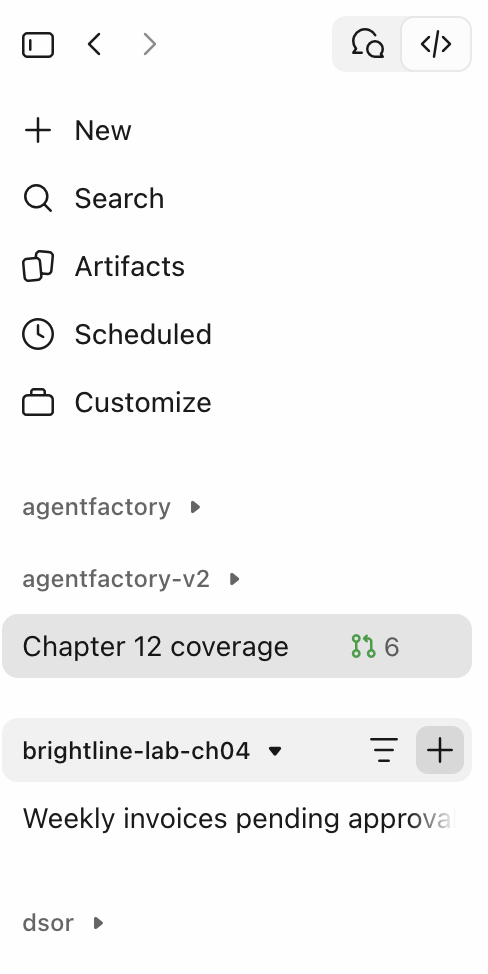
-
Review each one against its brief. Read the Changes card and run
/code-review. -
Start a session in the main folder, with Worktree off, and send: "Merge each worktree's branch into main, one at a time. Tell me each branch name first, and run the tests after each merge."

What you should see. Two sessions that never touched each other's files, a side chat that added nothing to the session, a helper's summary, and a main branch that holds both changes with passing tests.
For the exam. Subagents, their file and built-in kinds, forks, nested sessions, projects and what a cloud thread loads, and that messages between sessions carry text only, all in the details.
How Codex does it. Parallel chats use worktrees so they do not change the same files.7 Subagents work in their own threads, inherit the parent's sandbox, return summaries and use more tokens, the units in which model use is measured and billed.27 /side opens a side chat.13
- Start a New chat, select Worktree under the message box, and send the first brief. A worktree chat starts with no branch, so add: "Commit on a new branch."
- Do the same again, and send the second brief.
- While one works, run
/sideand ask how far along it is. - When the first is done, ask: "Spawn an agent to check this change against
AGENTS.mdand report only rule breaks" - Review each one against its brief. Run
/review, which reports findings and changes nothing. - Start a chat in the main folder, without a worktree, and send: "Merge each worktree's branch into main, one at a time. Tell me each branch name first, and run the tests after each merge."
What you should see. Two chats that never touched each other's files, a side chat that added nothing to the chat, a helper's summary, and a main branch that holds both changes with passing tests.
How OpenCode does it. You keep parallel work apart with worktrees, because a session can run in its own copy of the folder.28 Inside a session, subagents do side tasks in child sessions with fresh context,15 and /btw asks a side question without adding it to the conversation.29
- On the new-session screen, click the git branch, choose New worktree, and send the first brief.
- Do the same again, and send the second brief.
- While one works, ask a side question with
/btw: how far along is it? - When the first is done, ask: "Ask the explore subagent to check this change against
AGENTS.mdand report only rule breaks" - Review each one against its brief, in the Review tab.
- Start a session in the main folder, not a worktree, and send: "Merge each worktree's branch into main, one at a time. Tell me each branch name first, and run the tests after each merge."
What you should see. Two sessions that never touched each other's files, a side question that added nothing to the conversation, a helper's summary, and a main branch that holds both changes with passing tests.
Practice: outside the app
From Concept 12.8, the next lesson, so read it first. Run the same agent with nobody watching, once with what it needs allowed and once without. Ten minutes, plus the command-line install.
Opening a terminal. A terminal is the window where you type commands: Terminal on macOS, PowerShell on Windows. To put it in your folder, type cd and a space, drag the brightline-ap folder into the window, and press Enter.
How Claude Code does it. claude -p runs one task headless, from a command with nobody watching. Nobody is there to answer a prompt, so what it may do is granted before it starts.30 The desktop app cannot do this, so scripts use the command-line version, which you install separately.31
-
Install the command-line version with Anthropic's steps.
-
Click Terminal in the session's title bar. It opens in your folder. Type
claudeand log in, then leave it by typing/exit. Paste this whole command, press Enter, and it runs one task with nobody watching:claude -p "Run the tests and report whether every test passed, and how many ran." \ --allowedTools "Bash(npm test),Bash(npm test *)" \ --output-format json \ --json-schema '{"type":"object","properties":{"passed":{"type":"boolean"},"tests":{"type":"integer"}},"required":["passed","tests"]}'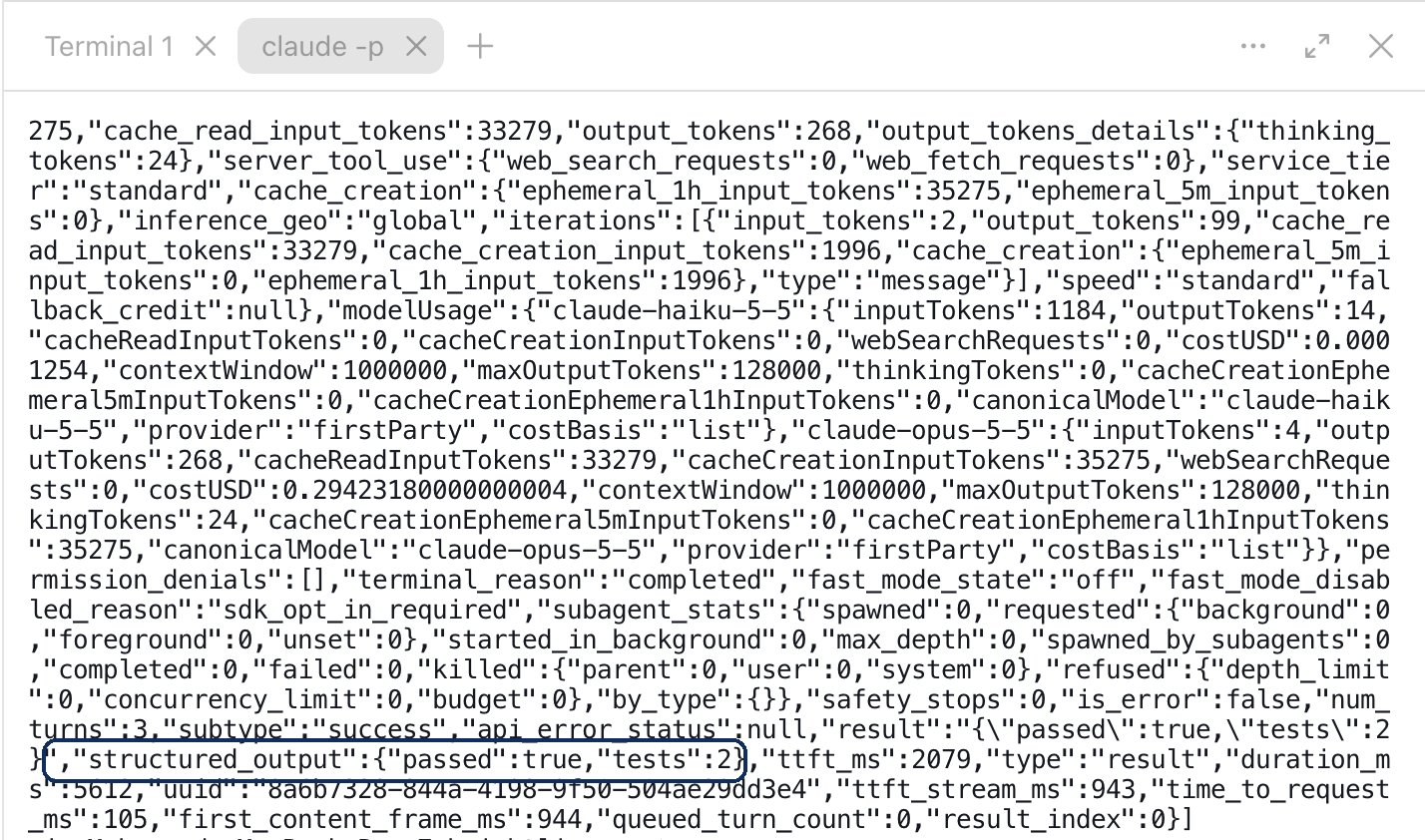
-
Run it without its
--allowedToolsline, by pasting this:claude -p "Run the tests and report whether every test passed, and how many ran." \ --output-format json \ --json-schema '{"type":"object","properties":{"passed":{"type":"boolean"},"tests":{"type":"integer"}},"required":["passed","tests"]}'Write down why the test command was refused.

What you should see. A JSON result with passed true. Then a second one with passed false, because the test command was denied with nobody there to approve it. If your settings make Auto your default, the second run can go through instead.
For the exam. claude -p, the three output formats, --json-schema and structured_output, --allowedTools, and --bare, all in the details.
How Codex does it. codex exec runs one task from a script, read-only unless you tell it otherwise, and prints only its final message. --json streams each event, and --output-schema shapes the answer.32
-
Install the Codex command-line tool. In a terminal in your folder, type
codexand sign in, then leave it by typing/quit. -
Run one task with nobody watching:
codex exec "Run the tests and report whether every test passed, and how many ran." -
Ask for something the read-only default does not allow:
codex exec "Add one line to the README that says where the data files are." -
Allow what it needs, and run it again:
codex exec --sandbox workspace-write "Add one line to the README that says where the data files are."
What you should see. An answer about the tests, or a report that the read-only default stopped it running them. Then a run that could not write, with the README unchanged, because nobody was there to widen its limits. Then a run that added the line, because you allowed it before it started.
How OpenCode does it. opencode run sends one task and prints the reply, as JSON if you ask. Nobody can approve anything, so a rule that says ask becomes a refusal.33 The opencode command is the same agent as the desktop app, connected to the same background server.8
-
Open a terminal and install the command-line version:
curl -fsSL https://opencode.ai/v2/install | bash. -
In your folder, run one task with nobody watching:
opencode run --format json "Run the tests and report whether every test passed, and how many ran."The rules in
opencode.jsoncset shell commands to ask, so this run is refused. -
Allow only the tests. In the desktop app, ask the agent to add this rule to
opencode.jsonc, after the rule for shell commands, and approve the edit. Then run the same command again:{ "action": "shell", "resource": "npm test*", "effect": "allow" }
What you should see. A first run refused, with a line saying the permission request was rejected. Then a second run that ran the tests, with its reply in JSON events.
The details, tool by tool
You do not need these for the steps. They hold the version numbers, the settings files and the facts the exam asks about.
The workspace.
- Claude Code is the Code tab in the Claude desktop app, on macOS, Windows and Linux (beta).34
- Before the first message you pick an environment, a folder, a permission mode and a model.6
- Each session runs Local, in the Cloud, over SSH (on another computer you reach over the network), or in WSL (Linux inside Windows), and a Cloud session keeps going after you close the app. A Worktree setting gives a session its own git worktree. You can save a setup you reuse as an environment.6
- A panel beside the chat shows where the session runs, what it is running, what it changed and how full its context is.6
- A Browser pane lets Claude start your app, open it and check its own changes.6 On macOS, an iOS Simulator pane, in public beta, does the same for a phone app, in local sessions only.35
- If your project has a web page, you can ask Claude to open it in the Browser pane.
Permissions and plans.
- The desktop app shows five modes, and the command line adds
dontAsk. Manual asks before edits and commands. Accept edits edits files and runs common file commands without asking:mkdir,touch,rm,rmdir,mv,cpandsed, inside the folder. Plan proposes a plan and edits nothing. Auto lets a background check review each action and block risky ones.10 - Bypass permissions is for sandboxed containers or virtual machines only, and on Pro, Max and Ultra it appears only after you turn it on in the app's settings.10
- Auto is the starting mode for new command-line sessions on every plan. Anthropic's permission-modes page dates this from version 2.1.283.36 Its changelog says 2.1.283 started only third-party providers and sessions with telemetry off in Auto, and 2.1.284 every plan.37 The desktop app reads the same settings and remembers the mode you pick for each folder, except Plan, which lasts for the current session only.6
- Rules live in settings files:
~/.claude/settings.json(you, every project),.claude/settings.json(the project, committed for the team) and.claude/settings.local.json(you, this project, kept out of git), with your organization's settings above all three. The order, highest first, is managed, then command line, then local, then project, then user, and lists such aspermissions.alloware merged.38 - A rule names a tool and a pattern, such as
"Edit(/data/**)"indeny. Rules are checked deny, then ask, then allow, so an allow rule never overrides a deny rule. A committed file's deny rules apply at once, and its allow rules wait until you trust the folder. Edit deny rules also cover shell file commands Claude Code recognizes, such assed, but not a script that opens the file itself.17
Rules files.
- From version 2.1.277, Claude Code reads
AGENTS.mdwith nothing else to set up, as long as there is noCLAUDE.mdorCLAUDE.local.mdin the folder or above it.16 By default, aCLAUDE.md,.claude/CLAUDE.mdorCLAUDE.local.mdreplacesAGENTS.mdfor Claude Code.16 /initdrafts aCLAUDE.md,16 and when we tried it on 1 November 2026, in version 2.1.314, it still wrote one beside an existingAGENTS.md, with no import. Keep your rules in one place with aCLAUDE.mdthat holds@AGENTS.md, with any lines for Claude Code alone below it.16/memorylists your instruction files and opens them for editing. It lists a projectCLAUDE.mdrow even when no such file exists, so that row proves nothing.16/contextshows what loaded at launch, under Memory files,16 and works in the Code tab too.6 The Project instructions setting in/configcan make Claude Code read both files.16CLAUDE.mdhas four levels: your organization's managed file,~/.claude/CLAUDE.mdfor you in every project,./CLAUDE.mdor./.claude/CLAUDE.mdfor the project, and./CLAUDE.local.mdfor you in this project only. Files in the folders above where you start load at launch, and those in subfolders load when Claude works there. All of them are joined, from the top folder down.@pathimports another file, relative to the file that imports it, up to four levels deep.16- A skill is a folder with a
SKILL.mdfile in.claude/skills/or~/.claude/skills/./<name>runs it, with$ARGUMENTSfor what you type after the name, and Claude can load it on its own unless the file saysdisable-model-invocation: true. Custom commands were merged into skills, and old.claude/commands/files still work.39 - Auto memory is the notes Claude writes for itself, per repository, and its start loads into every session.16
/doctor prompt-auditreports problems such as instructions written for older models, references to files or commands that do not exist, and files that contradict each other. It changes nothing until you ask.16/skill-doctorshows what each skill costs in context.40/output-stylesets how answers are written.41 - A mod is a plugin made of small JavaScript or TypeScript functions, called hooks, that run inside Claude Code. Each hook reacts to an event, such as a tool call, a prompt or part of the screen being drawn.42 It can watch the event, change it, or answer it, for example by refusing a command. So a mod can add a pane or a band above the prompt, add a command, hold a risky command until you decide, or send one step to a different model. Some of Claude Code's own features, such as
/diff, are mods.43 You can ask Claude to write one. It saves the files outside your repository, asks before each one in Manual and Accept edits modes, and loads the mod only in that session.44 Anthropic says mods are not sandboxed. A mod can read your files and secrets, see every prompt, and approve a tool call before you are asked. So install mods only from authors and marketplaces you trust, and before you enable one, runclaude plugin validate, which lists the events it handles and what it asks Claude Code to do.43 - In a terminal in your folder,
claudethen/memorylists the instruction files loaded./doctor prompt-auditis worth running every few weeks.
Context and sessions.
- The default model on paid plans is Opus 5.5, and effort runs from low to max.45
/contextshows what fills the context and/compactsummarizes it.6/rewindtakes back files Claude edited with its own tools, but not a file that only shell commands changed.21 It can also leave behind files that only a subagent edited.21 Git is still the record of what changed, as far as you committed it.- A cheaper session can still get a stronger second opinion.
/advisor opuslets a cheaper model consult Opus at key moments. It is experimental, and on a subscription its use counts toward your plan's usage limits.46
Many sessions.
- Claude automatically uses built-in subagents when appropriate, and each one's requests count toward the same usage limits as your main conversation. A
denyrule such asAgent(Explore)in your settings stops Claude from using that subagent.26 - Two sessions can sit side by side. A side chat reads the main session and adds nothing back, and you cannot return to it after you close the app.6
- A subagent is a file in
.claude/agents/with a name, a description, its tools and its model, and it runs in its own context. It can also run as a fork, a copy of the conversation so far. Explore, Plan and general-purpose are built in. Explore and Plan start without your project instructions, so put any rule they need in the brief.26 - In local and SSH sessions, Claude can start a task in a nested session that reports back, and can suggest a side task you start with one click.47
- On the Pro, Max and Ultra plans, Projects, in public beta and rolling out gradually, so you may not see them yet, run a coordinator that starts threads in the cloud. Cloud threads load the repository's
CLAUDE.mdbut not its skills or its permission rules.48 Anthropic's page does not mentionAGENTS.mdthere, so a repository used this way keeps aCLAUDE.mdthat imports it. - Messages between sessions carry text only, never history.49 Put what a worker needs in its brief.
- The Changes card shows the diff, and
/code-reviewreviews your branch and uncommitted changes and reports findings.50
Outside the app.
claude -p "<task>"runs one task headless, from a command with nobody watching. Concept 12.8 explains headless runs.--output-formatreturnstext,jsonorstream-json, which streams each event as a line of JSON, and--json-schemaputs a matching answer in astructured_outputfield.30- A headless run starts in Manual mode, unless a setting chooses another mode, and denies what needs approval, so list what it may do with
--allowedTools.30 In a folder you have never trusted, a headless run shows no trust prompt: the project's hooks still run and its MCP servers connect, while its allow rules are ignored.30 - For a script that must behave the same on every machine, use bare mode. Anthropic recommends
--barefor scripts, which skips yourCLAUDE.md, skills, hooks and memory. It does not use your subscription login, so it needs an API key, and Anthropic says it will become the default for-p, so a script that relies on your login may need a change later.30 /goalsets a condition, such as "all tests intest/authpass". Claude keeps working until the condition is met, the checking model judges it impossible, or an error you must fix clears the goal. After each turn, a small fast model reads the conversation and judges the condition. It does not run commands or read files itself, and a goal does not change the permission mode.51 Concept 12.8 explains why its "done" is a second opinion.
The workspace.
- Since July 9, 2026, Codex is a view inside the ChatGPT desktop app52 for macOS and Windows, with Linux in preview.53
- A chat runs on your computer, in a git worktree, or in the cloud, from a cloud environment you set up and publish once. A cloud chat does not automatically get your computer's local files, running processes, browser sign-ins or VPN access.7
- A built-in Browser lets Codex open your local web app, take screenshots and check its work.54 There is no iOS simulator pane, but the Computer Use plugin can operate other apps.55
- If your project has a web page, you can ask Codex to open it in its Browser.
Permissions and plans.
-
Ask for approval is OpenAI's recommendation. Approve for me asks only about actions it detects as potentially unsafe, Full access gives unrestricted access to the internet and any file on your computer, and Custom (config.toml) uses the permissions set in
config.toml. Without asking, Ask for approval lets it read files, make edits and run commands in the working folder. Even so,.git,.agentsand.codexstay read-only, so a commit or a new skill may ask first.5612 -
Behind them sit a sandbox (read-only, workspace-write or full access) and an approval policy, set in
config.toml.11 The two lines that set them:sandbox_mode = "workspace-write" approval_policy = "on-request" -
A beta setting can now protect one path. Permission profiles in
config.tomlcan mark a pathreadordeny, and a narrower rule stays in force even when a broader path is writable.19 They may change, and anysandbox_modein a loaded config replaces them, so the two lines above would cancel a profile. -
/planturns plan mode on or off.13
Rules files.
/initin the message box drafts anAGENTS.md.13 Codex readsAGENTS.mdfrom its home folder,~/.codexby default, then from each folder from the repository's root down to the one you start in, joined root first.18 It builds that list when the session starts, so a rule in a subfolder counts only if you start there or below. AnAGENTS.override.mdwins overAGENTS.mdin the same folder, and Claude Code does not read it.16- Skills use a
SKILL.mdfolder in.agents/skills/.57 Plugins58 bundle skills, MCP servers (connectors to other tools, Chapter 17) and hooks.59 - We found no advisor and no audit of your instruction files in OpenAI's documentation. The nearest thing to mods is Plugin Extensions, which add interfaces to ChatGPT.53
Context and sessions.
- GPT-6 Astra is the most capable model. GPT-6.1 Sol comes near it at a lower cost, GPT-6.1 Terra is fast and efficient, and GPT-6 Luna is the most efficient.60 You choose the model, and we found no automatic routing to a cheaper one,61 though Codex cloud selects its model automatically.53
Many sessions.
/goalsets what done looks like and shows progress,62 and/sideopens a side chat.13- The app shows each subagent's work and the summary it returns. A subagent takes the parent's model and effort unless set, and always the parent's sandbox.27 Ultra, on supported models, splits a complex task across subagents that work in parallel.60 Subagent work uses more tokens, the units in which model use is measured and billed.27
/reviewchecks your uncommitted changes or your branch and reports findings by priority without changing files.22
Outside the app.
The workspace.
- OpenCode is a free coding agent under the MIT license.64 You install it, pick a model65 and set its safety rules yourself.14 OpenCode Desktop, still labeled beta, talks to a background server on your computer.8 It runs locally on your machine, with no vendor sandbox.66
- For a model, bring your own API key, sign in with a ChatGPT Plus or Pro plan, run a local model,65 or buy OpenCode's Go plan ($10 a month).9 Since version 2.2.3, released October 30, 2026, a built-in Claude Agent provider uses your Claude Code login and models: install Claude Code, run
claude auth login, then choose Claude Agent in/connect.67 - Desktop has tabs, a browser pane the agent drives with screenshots,28 and a Timeline setting, Changed files, that shows each turn's changed files and diffs once you turn it on. You can fork a session from any message.67
Permissions and plans.
- Permission rules allow, ask or deny an action, set in
opencode.jsoncoropencode.json. By default it can reach files outside the project, unless a rule says ask.14 - OpenCode does not sandbox the agent. Its security policy says permission prompts are not isolation, and recommends a container such as Docker, or a virtual machine.66 The default rules allow almost everything,14 browser actions do not ask one by one,28 and OpenCode's web page says its local server is password-protected by default,68 while its security policy says server mode is unauthenticated without a password.6668
- Before your first task, set edits and shell commands to ask, keep OpenCode updated, treat plugins as code you choose to run, and never expose its server to a network.
Rules files.
- OpenCode reads
AGENTS.md, and version 2 does not readCLAUDE.md.20 The version 2 documentation lists no/init, but version 2.2.5 ships one, for guidedAGENTS.mdsetup.23 - Commands are markdown files in
.opencode/commands/.69 Skills useSKILL.mdin.opencode/skills/, and OpenCode also reads.claude/skills/and.agents/skills/.70 Plugins can hook into tool calls71 and add Desktop panels, which is still experimental.72
Context and sessions.
Many sessions.
- The built-in general and explore subagents run in child sessions with fresh context, not the parent's conversation, and custom agents can each have their own model.15 The Changed files timeline, or
git diff, also shows what changed.68
Outside the app.
--autoapproves everything not explicitly denied, anddenyalways holds.opencode runhas no schema flag, so the answer is in itstextevents.33
The differences that change a decision
- Which rules file it reads. All three read
AGENTS.md, the open format,73 so one file can serve all three. The one to watch is Claude Code: aCLAUDE.mdorCLAUDE.local.mdreplacesAGENTS.mdfor it by default. So if a project keeps aCLAUDE.md, that file importsAGENTS.md. - How rules are enforced. Claude Code enforces permission rules from settings files you can commit. Codex enforces a sandbox and an approval policy from
config.toml, and a beta permission profile can protect one path. OpenCode enforces its rules fromopencode.json, with no sandbox behind them. Put the "never" rules in each product's settings, not only inAGENTS.md. - How safe it is by default. New Claude Code sessions you type into in the command line start in Auto, with a background check, and a headless run starts in Manual. OpenAI recommends Ask for approval, with a sandbox that writes only inside the project. OpenCode starts with almost everything allowed, so you set its rules before the first task.
- Where it can run, and who sees your code. Claude Code and Codex can run a session on the AI vendor's machines. In any session, local or cloud, what the agent reads is sent to the model's provider under its terms. OpenCode with a local model is the only option here where the model stays on your computer, though its default rules still allow web fetches and searches unless you deny them.
- What it costs to start. Claude Code needs a paid Claude plan or a Console account. Codex starts on the free ChatGPT plan, in the desktop app, subject to rollout. OpenCode is free, plus whatever the model costs.
- How work splits, and what a worker knows. All three hand side tasks to subagents. Claude Code also has nested sessions and, on the Pro, Max and Ultra plans, projects with threads you can open. Codex adds Ultra, which splits a task across subagents on its own. OpenCode's subagents start with fresh context, and a Claude Code subagent can be a fork that inherits the conversation. Every extra agent costs context, so put what each one needs in its brief.
- Where skills live. All three use a
SKILL.mdfolder:.claude/skills/,.agents/skills/and.opencode/skills/. OpenCode also reads the other two, so one skill can serve OpenCode and one other agent. - Extending it, and seeing the app. All three have plugins and hooks. Claude Code also has mods, plugins that change how Claude Code itself looks and behaves. OpenCode's Desktop plugins and Codex's Plugin Extensions can add panels. All three can look at your app through a browser pane, and only Claude Code has an iOS simulator. Plugins are code that runs with your rights, and a screenshot is not a test.
Which agent for which job
- Learning, and the CCDV-F exam: Claude Code, because the exam is about Claude.
- A team that already works in ChatGPT: Codex, from the same app.
- Code that must never leave the company: OpenCode with a local model, on a machine you have secured.
What it costs
Claude Code needs a Pro, Max, Ultra, Team, Enterprise or Console account, and the free plan does not include it.31 On Pro, Max and Ultra it shares usage limits with Claude chat.74
Codex is on every ChatGPT plan, including Free, where it uses GPT-6 Luna. Plus is $20 a month. Pro plans are $100, $200 or $500 a month, and currently have no five-hour limit.75
What stays the same
- The folder you give a coding agent sets its scope, so choose the smallest folder that holds the task, and keep it under git. Settings, not the folder, stop it reaching further.
- Permissions are set by how hard a mistake would be to undo, whatever the product calls its modes.
- The rules travel with the repository, in a file every agent you use can read. You check that each place you run the agent loads them, and the "never" rules are also enforced by a setting.
- Git, not the agent's own undo, is the record of what changed, as far as you committed it.
- Done means the result matches the check you wrote first. Passing tests are the agent's evidence, and its report that it is done is a claim.
- Work is split only where the parts run on their own, and each part is reviewed before it merges.
- Tests check rules and numbers. They cannot show that a button is cut off or a page is blank. Where the agent can open what it built and look at the screen, it fixes what it sees before it reports back. A screenshot shows what the agent saw once, so your own check still decides.
Check yourself
Question 1 / 10 · drawn from 21
0 answered
In the Claude desktop app, which mode proposes a plan without editing code?
Sources
- Overview, Anthropic.↑
- Get started with Claude Cowork, Anthropic.↑
- Claude Cowork and chat are one Claude, Anthropic.↑
- Understanding ChatGPT and Codex usage limits, OpenAI Help Center.↑
- ChatGPT Work and Codex, OpenAI.↑
- Desktop application, Anthropic.↑↑2↑3↑4↑5↑6↑7↑8↑9↑10↑11
- Codex environments, OpenAI.↑↑2↑3
- CLI and server, OpenCode.↑↑2↑3
- OpenCode Go, OpenCode.↑↑2↑3
- Choose a permission mode, Anthropic.↑↑2↑3
- Sandbox, OpenAI.↑↑2
- Permissions, OpenAI.↑↑2
- Slash commands, OpenAI.↑↑2↑3↑4↑5↑6
- Permissions, OpenCode.↑↑2↑3↑4↑5
- Agents, OpenCode.↑↑2↑3
- How Claude remembers your project, Anthropic.↑↑2↑3↑4↑5↑6↑7↑8↑9↑10↑11↑12
- Configure permissions, Anthropic.↑↑2
- AGENTS.md, OpenAI.↑↑2
- Permissions, permission profiles, OpenAI.↑↑2
- Instructions, OpenCode.↑↑2
- Checkpointing, Anthropic.↑↑2↑3
- Code review, OpenAI.↑↑2
- Source code at version 2.2.5, OpenCode.↑↑2
- Compaction, OpenCode.↑↑2
- Snapshots, OpenCode.↑↑2
- Subagents, Anthropic.↑↑2↑3
- Subagents, OpenAI.↑↑2↑3
- Tools, OpenCode.↑↑2↑3
- Terminal interface, version 2, OpenCode.↑
- Run Claude Code programmatically, Anthropic.↑↑2↑3↑4↑5
- Advanced setup (installing the command-line version), Anthropic.↑↑2
- Non-interactive mode, OpenAI.↑↑2
- CLI commands, version 2, OpenCode.↑↑2
- Get started with the desktop app, Anthropic.↑
- iOS Simulator pane, Anthropic.↑
- Choose a permission mode, which mode a session starts in, Anthropic.↑
- Claude Code changelog, Anthropic.↑
- Settings files and precedence, Anthropic.↑
- Skills, Anthropic.↑
- Commands, Anthropic.↑
- Output styles, Anthropic.↑
- Mod events, Anthropic.↑
- Mods, Anthropic.↑↑2
- Create a mod, Anthropic.↑
- Model configuration, Anthropic.↑
- Advisor, Anthropic.↑
- Changelog, Anthropic.↑
- Projects in Claude Code, Anthropic.↑
- Cross-session messaging, Anthropic.↑
- Review locally with /code-review, Anthropic.↑
- Keep Claude working toward a goal, Anthropic.↑
- The ChatGPT desktop app, OpenAI.↑
- What's new in Codex, OpenAI.↑↑2↑3
- Browser, OpenAI.↑
- Computer Use, OpenAI.↑
- Agent approvals and security, OpenAI.↑
- Build skills, OpenAI.↑
- Plugins, OpenAI.↑
- Hooks, OpenAI.↑
- Codex models, OpenAI.↑↑2
- Model selection, OpenAI.↑
- Long-running work, OpenAI.↑
- Codex on GitHub, OpenAI.↑
- README, OpenCode.↑↑2
- Providers, version 2, OpenCode.↑↑2↑3
- Security policy and advisories, OpenCode.↑↑2↑3
- Changelog, OpenCode.↑↑2
- Web, OpenCode.↑↑2↑3
- Commands, OpenCode.↑
- Skills, OpenCode.↑
- Server plugins, OpenCode.↑
- Plugins, OpenCode.↑
- AGENTS.md, agents.md.↑
- Use Claude Code with your Pro, Max, or Ultra plan, Anthropic.↑
- Codex pricing, OpenAI.↑
- Owner
- Panaversity