11.1 Stop first, then read the record
- Status
- stable
- Owner
- Panaversity
- Approved
- Panaversity ·
In everyday life. Your washing machine floods the floor. You turn off the water before you look for the cause. And you look at where the water came from before you buy a new machine.
What you will learn. What to do first when an AI Worker's run goes wrong: stop it, find out what it did, and check what really changed. You practice it in steps 1 and 2 of the lab.
Why it matters. A quick fix destroys the evidence and lets the fault happen again.
In this chapter's story, Brightline Wholesale Supply, the book's example company, uses an AP Worker, the AI Worker that handles the bills the company owes. On Friday, January 15, 2027, it drafted five replies to vendors. Each said that a remittance notice, the message that tells a vendor what was paid, was attached. Nothing was attached, and Maria, the office manager, sent all five.
Your first reaction is to fix a failing worker at once. But that destroys evidence. Work in this order instead:
- Stop the run. Pause any job that runs on a schedule, or that starts when something happens, until you know the cause.
- Inspect the task record before you decide what went wrong.1
- Contain the harm. Hold anything the run set in motion, such as a payment, and have a person do the job by hand. Remove risky access the job does not need: unused connectors to other apps, write access and the ability to send messages.
- Correct the cause, once you know it (11.3 and 11.5).
- Verify everything the run affected outside the conversation: messages, files and records.2
- Resume the work with approvals on, so the worker asks before it acts. Give the worker back only the authority its Role Contract, its one-page job definition, already allows. Do it only once the worker's owner agrees the fix has worked.
A task record (Chapter 6) is everything a worker leaves behind about one run. It shows what the worker was asked, the steps it took, what it read, what it could reach and what it produced.
The record tells you what the worker reports it did. Only the connected systems tell you what actually changed. If the record says "email sent," open the sent folder.
Compare the record with the brief, the worker's written instructions, step by step. The Friday record showed the fault at once. Its step 2 said "access denied." Its step 3 said "drafting replies." A worker that cannot reach its input should stop and say so. This one guessed.
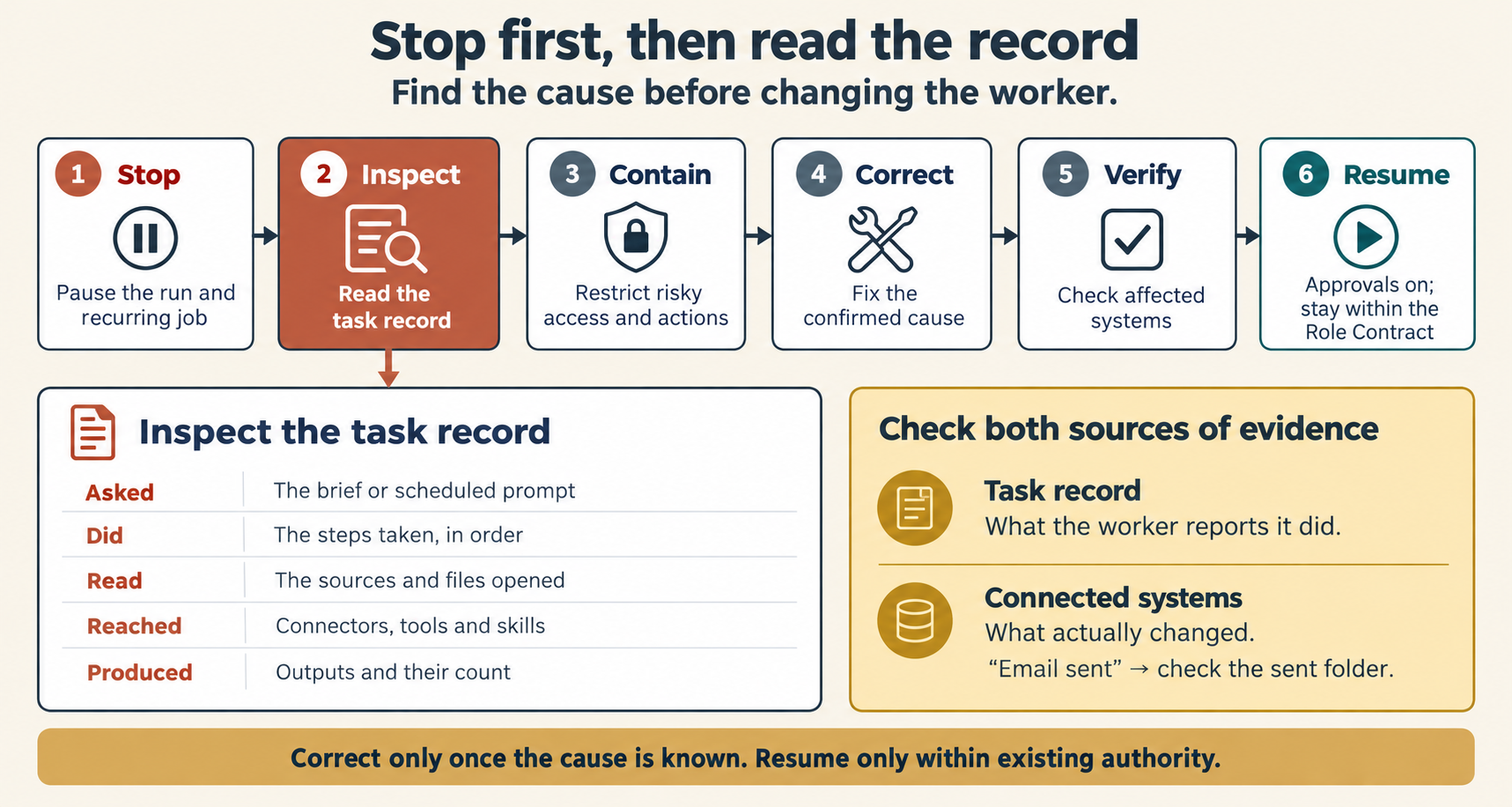
Figure 11.1. Stop first, then read the record. Correct only once the cause is known.
Anthropic, as verified 8 October 2026. Claude's Scheduled page lists a task's past runs, and each run is its own session. The page lets you pause, edit or run the task.3 A running task shows its progress at each step and delivers its outputs to the session.4 There are more details in The details on both AI vendors.
OpenAI, as verified 8 October 2026. ChatGPT's Scheduled page shows results and lets you pause tasks. OpenAI's documentation gives the reasons a task pauses: it needs an approval or further action, it is inactive, or its chat was deleted. A quiet event-triggered task may be paused, may be waiting for approval, or may have lost its connection to its app.5 ChatGPT Work is an agent that acts across your apps and files. While one of its tasks runs, you can review its progress, change its direction and approve important actions. OpenAI's documentation describes no separate step log.6 There are more details in The details on both AI vendors.
Comparison. Both AI vendors show you the results of past runs and let you pause a task. Only OpenAI's documentation lists the reasons a scheduled task pauses, so on OpenAI, start with that list. On Anthropic, start with the run itself.
What stays the same. Stop before you fix. The record shows what the worker reports it did. The systems it worked on show what changed. Check both.
Check yourself
Question 1 / 8
0 answered
A scheduled job produced a wrong report this morning. What do you do first?
Sources
- Problem Solving with General Agents: A 90-Minute Crash Course, Panaversity, first edition.↑
- Workflow Design & Diagnosis, Panaversity, first edition.↑
- Schedule recurring tasks in Claude Cowork, Claude Help Center.↑
- Get started with Claude Cowork, Claude Help Center.↑
- Scheduled tasks in ChatGPT, OpenAI Help Center.↑
- ChatGPT Work and Codex, OpenAI Help Center.↑
Chapter 11. When the Worker Goes Wrong
How to stop a failing AI Worker, read its task record, check that a run really worked, find which of five causes a failure comes from, and fix it so the fix lasts, on Claude or ChatGPT.
11.2 Ran is not the same as worked
Why a run that finished does not prove the work succeeded, and how to give every recurring job a success signal.