2.4 Choosing a surface and a model
- Status
- stable
- Owner
- Panaversity
- Approved
- Panaversity ·
In everyday life. Planning a family trip takes different tools. For a quick question, you send a text message, and you do not need to keep it. For dates that everyone must see and change, you use a shared family calendar. For the final plan, you print one page to take with you. Each tool fits the job, and what must last afterward. Power is a separate choice. You ride a bicycle to buy groceries. You rent a moving truck only when you move to a new home.
A worker's runtime needs include two everyday choices: the surface it works on, and the model that does the thinking. Both are replaceable. Both still decide whether the work succeeds.
A surface is one way a product runs work for you. There are three. In chat, the AI answers you in the conversation. An agent that works on its own takes a task you hand over and carries out its steps. An always-on agent keeps working between conversations. The surface decides what the AI can do, which tools and machine it uses, and how long it runs.
The same chat app can be two things. When Maria named the chat window in 2.3, she meant a channel: where people reach the worker. Here, chat is a surface: the way the product does the work, by answering in the conversation.
Choose the surface by the rung. The rung is the step on Chapter 1's ladder of interaction that the work belongs to: a message, a task or a role. Each rung has its own surface. A message goes to chat. A task goes to an agent that works on its own. A role goes to an always-on agent. A role can still run as tasks. In 2.2's terms, a Delegated AI Worker does its role one task at a time, through an agent that works on its own. A Standing AI Worker keeps working between tasks, so it needs an always-on agent.
Some products give each surface its own name. Others run them from one conversation and decide from your request. The dated boxes in 2.5 show both.
Add what the work needs, and choose the output by what must last. The table puts every choice in one place. Only its first three rows are surfaces. A project, a connector, a skill and research work with any surface. An artifact and a shared document are outputs, the form the result takes.
| The work | What to use | Kind of choice | What lasts afterward |
|---|---|---|---|
| A question, a draft or an explanation you read once | Chat | Surface | The conversation |
| Multi-step work you hand over, often while you are away | An agent that works on its own | Surface | The delivered result |
| Work that continues between conversations | An always-on agent | Surface | Its identity, context and record of activity |
| Work that reuses the same instructions and files | A project | Standing context (2.3) | The instructions, files and chats in it |
| Information kept in another app, such as an inbox or a shared drive | A connector | Tool (2.1) | The link. The information stays in the app |
| A procedure to follow the same way every time | A skill | Procedure (2.1, 8.5) | The saved procedure |
| A question that needs many sources, checked and cited | Research | Built-in tool | A cited report |
| Content you keep editing with the assistant, then share | An artifact | Output | The artifact |
| A document a team edits together, with AI help | A shared document | Output | The shared document |
An artifact is a result made to show other people, such as a document, a dashboard or a small tool. You keep it, change it with the assistant and share it with your team. Any surface can produce an output. A task can deliver an artifact, and you can also shape one yourself, turn by turn, in chat. On some products, a shared document is itself an artifact (2.5).
A connector links the worker to another app, such as the AP inbox or a shared drive, so it reads information where it is kept. Concepts 8.5 and 7.5 show connectors at work.
Two more features work with any surface, and later chapters teach how to use them. Memory keeps your preferences and ways of working across conversations. Concept 8.4 shows what belongs in it and what must stay out. Code execution lets the AI write and run a small program, so a total is worked out, not guessed. It checks the arithmetic, not whether each row belongs in the total, and Concept 6.4 shows how to check both.
The kind of artifact to ask for, such as a document, a slide deck or a dashboard, is part of the brief's format (5.7).
Tell close choices apart. Some choices sit close together. Each row names the right choice, the one people often pick instead, and why that one falls short.
| The work | Use | Not | Why not |
|---|---|---|---|
| The same background and files, each time the work comes back | A project | A new chat each time | You would paste the same background again and again |
| Steps to follow the same way every time | A skill | Project instructions | Instructions hold rules that load with every conversation, such as "always cite the policy". Steps for one kind of task belong in a skill, which loads only when that task comes up (8.5) |
| Your preferences, and what earlier chats settled | Memory | Project files | Files hold stable facts, such as the approved policy |
| Information that keeps changing in another app, such as new emails | A connector | Pasting or uploading it each time | A copy is out of date as soon as the app changes |
| Many sources, checked and cited | Research | A quick web search | A web search suits one quick fact |
| A number you will report, such as a total | Code execution | The model's own arithmetic in its reply | The model can get a long sum wrong |
One role usually combines several of these choices. The AP Worker drafts replies to vendor questions in chat. It builds the weekly register as a task, inside a project that holds its standing instructions, and the register comes back as a spreadsheet file. People reach the worker through its channels: the AP inbox and the team chat app. In its Role Contract, the surfaces it uses go under runtime needs, because the surface is how the product runs the work. So does the project, if the worker uses one. A project runs nothing itself: it is how one product loads the worker's standing context, and it is rebuilt if the AI vendor changes. The project's files go under knowledge sources. Its instructions carry the contract's rules, such as the worker's role, its sources and its limits (8.5). The steps the worker follows, such as checking an invoice total, go under procedures (skills). They are saved as a skill, which holds steps, not rules, and sits outside any one project. The AP inbox and the team chat app go under channels (2.3). The connector that reads the AP inbox goes under tools, and so does code execution, which adds up the register. What the worker may remember goes under memory.
Choose the model by trading off capability, speed and cost. Larger models handle harder judgment, but they cost more and respond more slowly. Smaller models are fast and cheap, and they suit high-volume, simple steps. Most models also have a second control, called effort or reasoning level. Inside one model, it trades thinking time for quality. Three rules follow.
- Start with the recommended default. Use the AI vendor's recommended default model at its default effort. For simple, high-volume steps, you can also start with a small, fast model. Move to a larger one only if it is not good enough.
- Raise effort before you change models. First ask why it failed. Missing information, an unclear brief or a broken tool are fixed in the brief or the setup, not with more thinking. When the model simply reasoned badly, more effort on the same model is often the cheaper fix.
- Decide with your own test cases, not a leaderboard. Run the candidate models on the cases in the worker's evaluations, such as Chapter 1's fifteen invoices. Compare their accuracy, time and cost. A full score on familiar test cases is a lab result, not proof of reliability on real work.
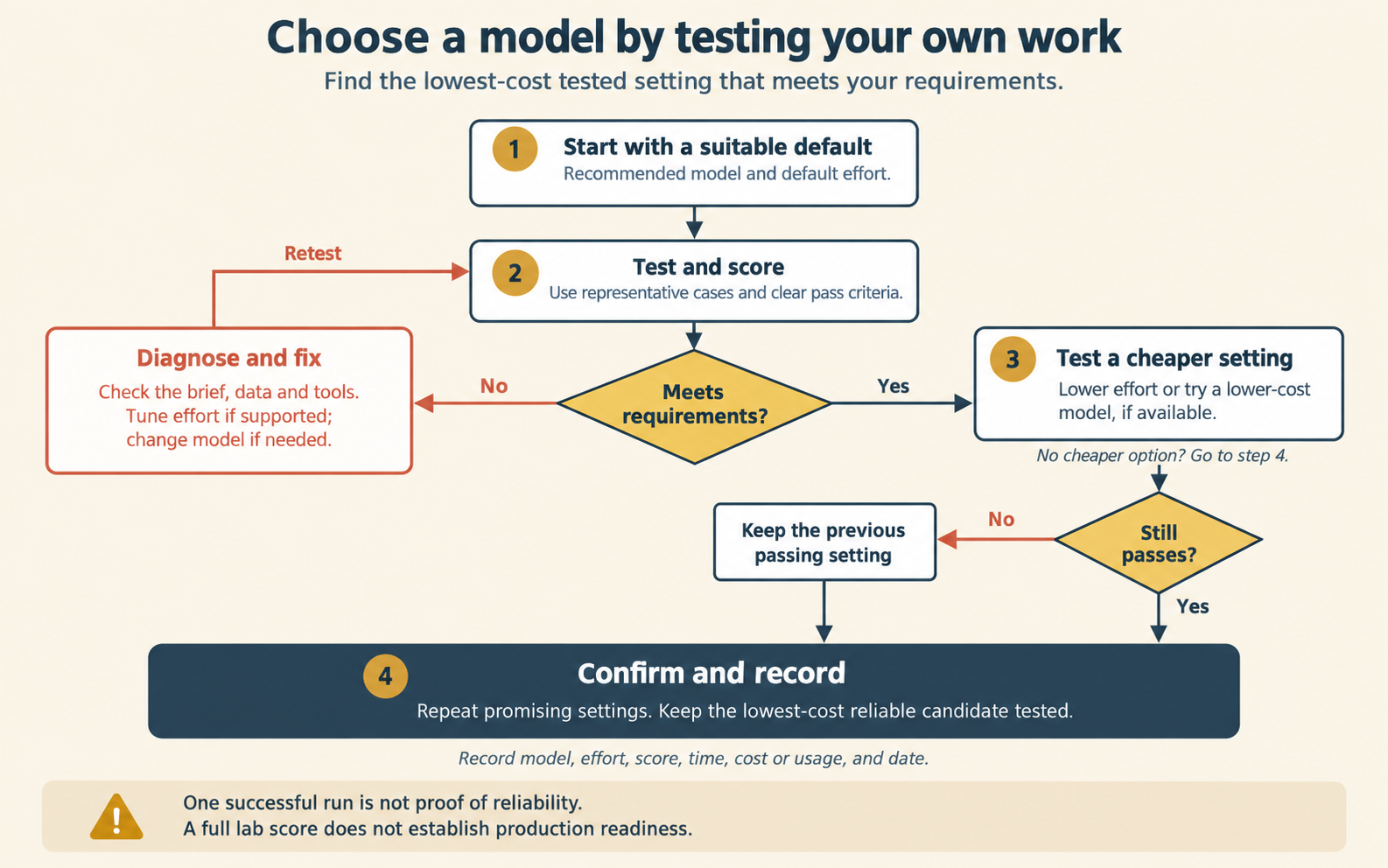
Figure 2.4. Choosing a model setting. Find the cause of a failure before you raise effort or move to a larger model. Keep the cheapest setting that gets a full score.
The model belongs in the Role Contract as a runtime need, not as part of the worker's identity. If the AP Worker becomes a different worker every time the AI vendor releases a new model, the definition is in the wrong place.
Check yourself
Question 1 / 10 · drawn from 15
0 answered
The controller asks whether a new state rule changes how vendors must be paid, and wants every claim traced to where it came from. Which feature fits?
2.3 Worker, runtime and channel
Why a worker is defined apart from the runtime that executes it and the channels people reach it through, and two tests that check it.
2.5 How both AI vendors realize it
How Anthropic and OpenAI offer surfaces and models today, the three differences that change a decision, and what holds on either AI vendor.